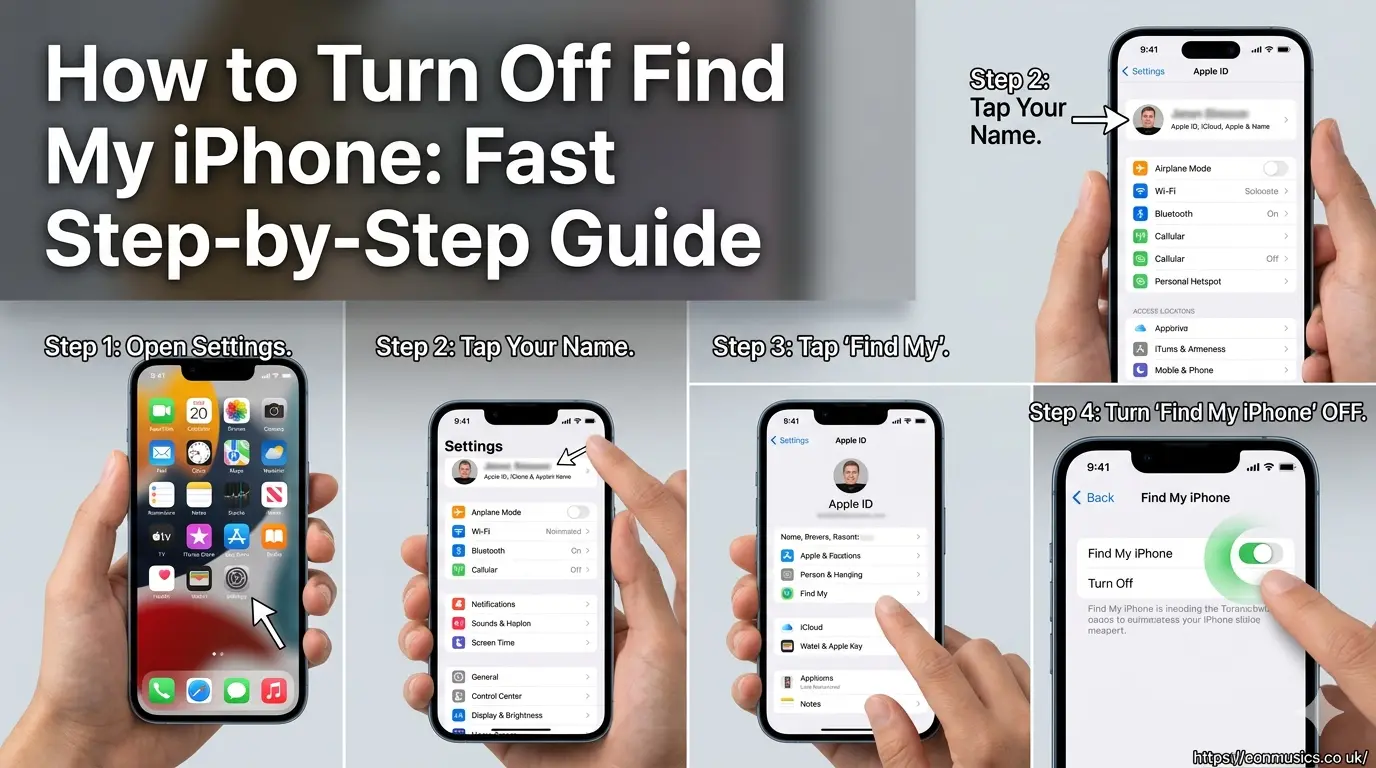
Are you struggling to prepare your Apple device for a trade-in, sale, or repair? Protecting your private location data is important, but a persistent tracking link can completely block your transition to a new phone. You need a fast, straightforward way to safely disable this setting without losing your important files.
Follow this complete guide to discover how to turn off Find My iPhone directly from your device, remotely via iCloud, or through an authorized Mac computer.
Why You Need to Disable Find My iPhone
Turning off location tracking is a necessary step before you reset or sell your smartphone. Apple uses an integrated security framework called Activation Lock to prevent unauthorized users from using your hardware. If this feature remains active, the new owner cannot set up the device, and repair centers will refuse to service it. Disabling this setting signals to the official Apple Account registry that you willingly authorize ownership transfer or maintenance.
How to Turn Off Find My iPhone Directly in Settings
The fastest way to disable the tracking feature is directly through the native operating system layout on your working mobile device.
- Open the Settings application on your device.
- Tap your Apple Account profile name located at the top of the menu screen.
- Select the Find My menu option from the list.
- Tap on Find My iPhone at the top of the next screen.
- Toggle the green switch to the off position.
- Enter your official Apple Account password when prompted.
- Confirm the action by tapping Turn Off in the top right corner.
Managing Stolen Device Protection Delays
If you have security configurations enabled on your mobile device, you might encounter a security delay. Stolen Device Protection requires a mandatory one-hour wait period if you attempt to change critical security settings away from familiar locations like your home or workplace. If this screen appears, you must start the delay countdown, wait 60 minutes, and then complete the biometrics verification to finalize turning off the feature.
How to Turn Off Find My iPhone Remotely via iCloud
If you already sold your mobile device, lost it, or have a completely broken screen, you can still sever the account link using a desktop web browser.
- Navigate to the official website at iCloud.com/find.
- Sign in using your personal Apple Account credentials.
- Click on the All Devices drop-down menu at the top center of the interface.
- Select the specific smartphone model you want to disconnect.
- Click Remove from Account to completely unlinked the device.
Important Note: Do not click “Erase iPhone” if your goal is simply to transfer ownership to a buyer who is waiting to activate it, as this may lock the device to your credentials again.
+-------------------------------------------------------------------------+
|                  Find My iPhone Deactivation Matrix                     |
+---------------------+-----------------------+---------------------------+
| Method              | Requirements          | Best For                  |
+---------------------+-----------------------+---------------------------+
| Device Settings     | Working Screen, Pass  | Standard trade-ins & sales|
| iCloud Web Portal   | Browser Access, Pass  | Broken screens, lost units|
| Mac System Settings | Linked macOS, Pass    | Backup desktop management |
+---------------------+-----------------------+---------------------------+
Disabling Location Tracking Through a Mac Computer
You can use a linked desktop computer running macOS to manage your connected mobile hardware ecosystem without touching the phone screen.
Steps for macOS Sequoia, Sonoma, and Ventura
Open your System Settings by clicking the Apple logo in the top-left corner of your desktop. Click your account profile name at the top of the sidebar panel, then click on the iCloud option. Navigate down to the section labeled “Saved to iCloud”, select the “See All” button, locate Find My Mac or your connected device ecosystem, and select the turn-off command.
Steps for Older macOS Versions
Click the main Apple menu icon and launch your System Preferences application. Click on your Apple ID configuration icon, then select the iCloud category from the left sidebar menu. Scroll down through the application checklist until you find the tracking app checkbox, uncheck the box, and type your main account password to save changes.
Removing Activation Lock Without an Apple Account Password
If you forgot your password, you cannot turn off the tracking system using standard methods. You must reset your login details by visiting the official reset portal or by using the Apple Support app on another iOS device. If you possess the original proof of purchase document from an authorized retailer, you can submit an official Activation Lock support request directly to Apple engineers to unlock the hardware manually.
How Deactivating Tracking Affects AirTags and Ecosystem Items
Turning off the primary phone tracking security feature automatically alters how you interact with your connected smart accessories. Your paired AirTags, secondary smart wallets, and wireless earbuds rely on the primary phone network to report location changes. When you disable the central phone tracking system, you also lose the real-time radar mapping utility for those peripheral items until you reactivate the service.
Preparing Your Device for a Retail Trade-In Event
Before handoff to a retail technician or shipping carrier, ensure you wipe all remaining personal data after disabling the tracking features. Navigate back to the primary settings panel, open the General category, scroll to the bottom, and choose “Transfer or Reset iPhone”. Select “Erase All Content and Settings” to completely clean the local storage drive while leaving the activation mechanism fully unlocked.
Troubleshooting Common Deactivation Error Messages
Sometimes the system throws verification errors or fails to save your preference updates. This usually happens because of an intermittent wireless network signal or out-of-date system software installations. Turn off your Wi-Fi connection, switch to cellular data, restart your device hardware completely, and attempt the password entry step again to resolve basic transmission issues.
Conclusion
Taking control of your device security keeps your transition stress-free. Whether you use the local settings menu or log in via iCloud web tools, disabling the active tracking feature unlocks your phone for its next chapter.
If you are planning to sell or upgrade your device today, open your Settings menu right now and follow these steps to prepare your hardware properly. For technical issues regarding forgotten account credentials, look at the authorized guides on Apple Support to restore account access safely.
Frequently Asked Questions
Can I turn off Find My iPhone if the screen is completely broken?
Yes, you can turn off the tracking system remotely by visiting iCloud.com/ on a computer. Log into your account profile, choose the broken device from the list, and select the remove device option to clear the activation lock.
Will turning off Find My iPhone delete my photos or text messages?
No, disabling the location tracking application does not delete any personal data from the storage drive. It only disconnects the hardware from the global tracking map network and removes the activation safety lock feature.
Why does my phone ask for a password when turning off tracking?
Apple requires your personal account password to prevent unauthorized users or thieves from disabling the tracking grid. This security verification ensures only the true owner can alter device tracking parameters.
Can a buyer activate my old phone if tracking is still turned on?
No, the buyer will face an Activation Lock screen during initialization if the service is active. The system will demand your personal account password, rendering the phone unusable for the new buyer.
What should I do if I forgot my Apple Account password to turn it off?
You must reset your account security configuration by visiting the official password reset site. Once you recover access and establish a new password, you can return to the settings panel to disable tracking.
Does turning off Find My iPhone disable the shared family map location?
Yes, turning off this feature stops broadcasting your location coordinates to everyone in your Family Sharing network. Your device icon will show as offline on their map screens until you turn the feature back on.